
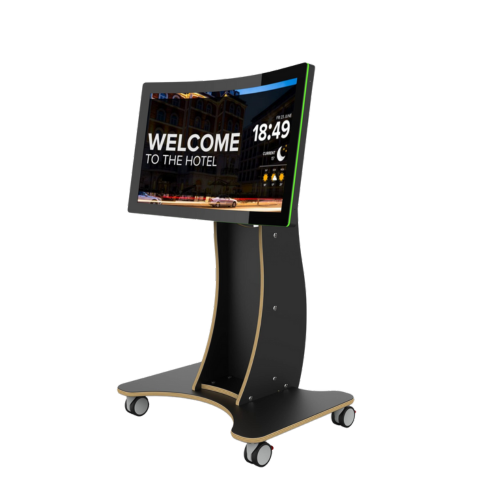
Touchscreen technology is changing the way organisations operate, making interactions more intuitive, engaging and efficient. From care homes and schools to offices and hospitality, touchscreen solutions are no longer a luxury. They have become an essential tool for improving communication, learning and customer experience.
Companies like Touchscreen Company are at the forefront, offering purpose-built touchscreen solutions that are easy to install, reliable and supported by friendly UK-based teams. Whether it is enhancing learning in schools, streamlining workflows in offices or creating memorable experiences in hotels, these interactive devices help organisations work smarter, connect better and make every interaction count.
Table of Content
- Why is professional touchscreen installation crucial for organisations?
- 6 expert touchscreen installation tips essential for organisations?
- What are the common installation mistakes to avoid?
- Touchscreen Company support for staff training & maintenance?
- FAQs
- Conclusion
Why is professional touchscreen installation crucial for organisations?
Professional touchscreen installation is essential for organisations because it ensures the technology works smoothly from the start. A properly installed touchscreen provides a responsive experience for staff and customers while reducing the risk of technical issues, downtime, and unnecessary repair costs.
Professional installation also takes into account the specific needs of your environment, whether it is a busy office, school, care home, or hotel conference room. This ensures touchscreens are positioned for maximum accessibility, safety, and usability.
Investing in professional installation saves time, protects your technology, and allows your organisation to get the most from its interactive solutions.
6 expert touchscreen installation tips essential for organisations?
Installing a touchscreen in your organisation might seem straightforward, but getting it right can make all the difference to usability, staff efficiency, and long-term performance. Here are six expert tips every organisation should consider:
- Choose the Right Device – Consider screen size, resolution, and compatibility with your existing systems. The right touchscreen makes daily tasks easier and improves engagement.
- Plan the Placement Carefully – Position your touchscreen where it’s easily accessible, visible, and safe for all users. Think about height, lighting, and foot traffic to avoid inconvenience.
- Ensure Proper Mounting – Whether wall-mounted or freestanding, make sure the touchscreen is securely installed. Professional mounting prevents damage and ensures stability during use.
- Check Connectivity and Integration – Make sure your touchscreen works seamlessly with your network and other devices. Smooth integration avoids frustrating downtime and boosts productivity.
- Provide Staff Training – Even the best touchscreen is only as effective as the people using it. Offer training sessions so staff are confident and can make the most of the technology.
- Schedule Regular Maintenance – Regular cleaning and software updates keep your touchscreen running smoothly for years. A little attention now saves a lot of hassle later.
By following these six expert tips, organisations can enjoy a more efficient, reliable, and user-friendly touchscreen experience.
What are the common installation mistakes to avoid?
Installing a touchscreen solution may seem straightforward, but organisations often make mistakes that can affect both performance and usability. Common issues include choosing the wrong location, mounting the device incorrectly, neglecting proper power or network connections, and skipping calibration. Overlooking these details can lead to a frustrating experience for staff and visitors and reduce the effectiveness of the touchscreen.
Another challenge is ensuring staff know how to use the touchscreen effectively. Without proper guidance, devices may be underutilised or handled incorrectly, which can shorten their lifespan. Working with an experienced Touchscreen Company helps avoid these common pitfalls.
Their expertise ensures your touchscreen solution is installed correctly, maintained properly, and that staff receive the support they need to make the most of the technology.
Touchscreen Company support for staff training & maintenance?
Touchscreen Company provides full support to ensure your touchscreen solution works seamlessly from day one. As a trusted UK supplier, they not only install your devices but also guide your team through staff training, tailor software to your organisation’s needs, and provide ongoing maintenance to keep everything running smoothly.
Their friendly UK-based support team is always available to answer questions, provide practical advice, and help you get the most from your touchscreen solution. With Touchscreen Company, organisations can adopt interactive technology with confidence, knowing their devices are reliable, easy to use, and designed to make daily operations more efficient and engaging.
FAQs
- Why is professional touchscreen installation important for organisations?
Professional installation ensures your touchscreen solution works reliably from the start. It prevents common issues such as poor calibration, connectivity problems, or device damage, helping staff use the technology confidently and efficiently. - How do I choose the right touchscreen for my organisation?
Consider the environment, user needs, and intended purpose. Size, durability, touchscreen type, and software compatibility all play a role. Organisations should also ensure the device can be integrated with existing systems for a smooth workflow. - What common mistakes should be avoided during touchscreen installation?
Common errors include placing devices in poorly lit or high-glare areas, using incorrect mounting hardware, neglecting software setup, and insufficient staff training. Following expert tips helps avoid these issues and ensures longevity. - How can organisations maintain optimal touchscreen performance?
Regular cleaning with recommended materials, timely software updates, and periodic calibration keep touchscreens responsive and reliable. Training staff on proper use also prevents accidental damage and maximises lifespan. - Can Touchscreen Company help with staff training and ongoing maintenance?
Yes. Touchscreen Company offers full support for organisations, including staff training, software configuration, and ongoing maintenance. Their UK-based team provides guidance and assistance to ensure your touchscreen solution is user-friendly and effective in daily operations.
Conclusion
Proper touchscreen installation makes a real difference for organisations, improving usability, efficiency, and engagement. By following these 6 expert tips, you can avoid common pitfalls, maximise performance, and ensure your team is confident using the devices.
With the right guidance and support from a trusted supplier like Touchscreen Company, your touchscreen solution will deliver lasting benefits for your workplace.